27, ఏప్రిల్ 2014, ఆదివారం

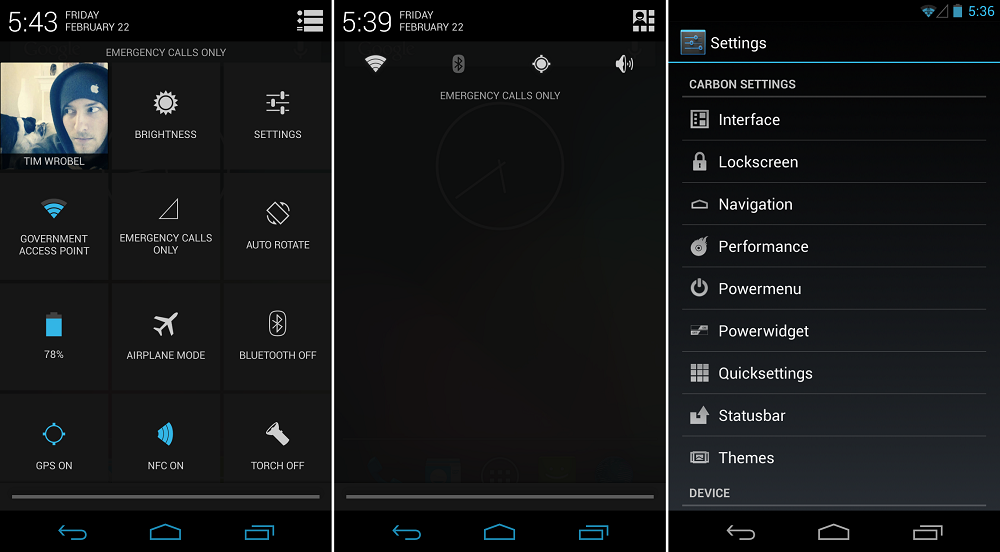
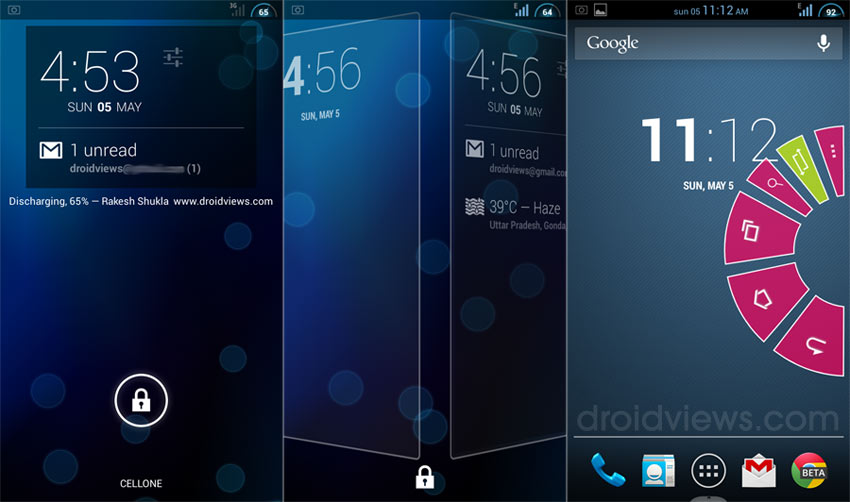
This tutorial will demonstrate a dedicated step by step process of installing Carbon custom ROM. The update guide is compatible with S4 mini model numbers 19190 and 19195 and also, it brings a customized version of the Android 4.3 Jelly Bean OS. Carbon custom ROM is one of the famous and recognized Android firmware, known for its looks and functionality.
You might be bewildered after knowing that this update is exclusively based on Android 4.3 Jelly Bean but do not worry. Soon there will be an update with an Android 4.4.2 KitKat powered Carbon platform, hence using Android 4.3 is nothing but temporary.
Carbon
Disclaimer – Please note that the firmware is not an official update and has been designed & developed by a third party and has nothing to do with Samsung or Google. Also, use this guide for Samsung Galaxy S4 mini models 19190 and 19195 only or else you might end up bricking your smartphone.
Before we go ahead into the depths of this guide, we should ensure the following: As a first step, we should start with rooting our devices because without root access, the firmware will not work. We should also install a custom recovery image using the latest version of CWM or TWRP recovery. It is essentially used as a tool for the installation procedure later. Next is to ensure that we have saved our important data in the internal storage of our phone as it is apparent that the installation will wipe out data.
As it is a manual operation, it is recommended to use a PC to safely complete the process. We should connect our Samsung device to a computer and establish a connection by enabling USB debugging. Finally, we should ensure that the installation is carried out on a device with 80% battery.

Installation
Carbon-ROM-Android
Follow the instructions carefully:
  1. Download Carbon file for Galaxy S4 mini 19190 from here and 19195 from here.
  2. Download Google Apps package also and save all these files on the computer without unzipping.
  3. Connect device with the computer and transfer the files to the phone’s SD card memory.
  4. Unplug the USB cord and turn off the device, then wait for a few seconds before turning it on.
  5. Boot the device in recovery mode.
  6. From there, wipe the system and clear cache by selecting – ‘wipe data factory reset’, wipe cache partition’ and ‘wipe dalvick cache’.
  7. From the main menu in Recovery mode, select ‘install zip from SD card’ and ‘choose zip from SD card’.
  8. Select the Carbon custom ROM from the card and install it.
  9. Repeat the process and flash Google apps package.
  10. Finally, select ‘reboot system now’ from the main menu of recovery page.
This successfully marks the completion of the process. The new custom software brings in beautiful apps and features. The major benefits of the custom ROM include increased speed, increased battery life, improved browsing and a customized Jelly Bean user interface to say the least. Enjoy!
← How to Install Android 4.4.2 KitKat In Your Samsung Galaxy Note Using Lightning Custom ROM How to Unsend a Text Message on Android →

Welcome to One Click Root!

One Click Root is the world’s leading Android rooting software. With just a single click, you can root your Android smartphone or tablet and have access to hundreds of new and exciting features.
Here are just a few of the reasons why more and more people round the world are rooting their Android devices:
  • Access more apps
  • Preserve battery life
  • Faster performance
  • Wi-Fi and Bluetooth tethering
  • Install custom ROMs
  • Access blocked features
  • And so much more!
Rooting an Android on your own can be risky. It requires quite a bit of technical knowledge, and you risk turning your Android smartphone into a useless brick. At One Click Root, we’ve developed a software solution that can quickly and safely root all popular Android smartphones and tablets.
Using the One Click Root software, anybody can root their Android phone to unlock all of the benefits listed above. The software is extremely powerful, but it’s also very easy to use. If you know how to click your left mouse button, then you won’t have any problems downloading and installing the One Click Root.
The One Click Root software is becoming more powerful every day. We’re always adding new rootable Android phones in order to make our software as useful as possible. With a wide selection of Samsung, HTC, LG, and Motorola Android devices available to be rooted, we give users everything they need to unlock the full potential of their Android smartphones and tablets.

Why root Android?

Rooting an Android smartphone comes with a number of major benefits. Most hardware manufacturers place major restrictions on their Android operating systems. For example, companies like Samsung will only allow users to download certain apps, and some users might not like the virtual keyboards included on Motorola or HTC devices.Other people simply want to install cool new apps.
Rooting Android will give users access to all of these benefits and more. Here are some of the most popular reasons why people choose to root their Android devices:
Awesome new apps: Some apps are only available on rooted Android devices. Unfortunately, many of these apps are extremely cool. For example, an app called AdFree blocks all incoming advertisements on your Android smartphone or tablet. And an app called SetCPU will automatically control the CPU usage of your device, vastly increasing its battery life. From new themes to wireless tethering and more, people love rooting Android because of the awesome new apps available.
Custom ROMs: Custom ROMs allow users to completely change the interface of their Android smartphone or tablet. While default Android interfaces aren’t necessarily bad, many users prefer the free-form usability of popular custom ROMs like CyanogenMod or MIUI. These custom ROMs can make your Android smartphone or tablet look exceptionally cool.
Full control over your system: The term ‘rooting’ comes from the fact that users have full control over the ‘root’ of their system. Instead of being restricted from editing essential system files and other data, Android users now have full control over their system. This means you can edit core apps, install new themes, execute commands, and perform all sorts of other special tasks.
Install apps on your SD card: Your Android device only has a limited amount of space. If you want to maximize the amount of space on your device, then you might have tried to install new apps onto your SD card. Unfortunately, most Android builds prevent you from doing this. After rooting your Android device, you’ll find this problem to be a thing of the past. You can now install apps on your SD card, which means more space for your important files.
Faster performance: Most Android devices are already pretty fast. But rooting your Android phone can make them even faster. Some custom ROMs are specifically designed for speed, which means faster transitions between apps, faster internet speeds, and all sorts of other performance-related benefits.
New virtual keyboards: If you don’t like typing on your Android’s virtual keyboard, then rooting your Android device can fix that problem. There are dozens of new virtual keyboards available. Since you can only edit the keyboard by accessing the core files of your device, rooting your Android allows you to easily install these keyboards.
Longer battery life: If you’re disappointed with the battery life of your Android device, then don’t worry - rooting Android can fix that problem. There are plenty of apps that allow you to maximize the battery life of your device. You don’t even have to sacrifice performance in order to preserve your battery life!
Because you can: Android phones and tablets are exceptionally powerful. When you’re stuck with the default operating system, you’re not using your device to its full potential. Somebody else is telling you how to use your phone, and that means you don’t have the freedom to use your phone the way you want. After rooting your Android phone or tablet, you will break free of the chains on your device and use the hardware to its full potential.
For all of these reasons, Android rooting is becoming popular with users all over the world. If you’re ready to safely and easily start using your Android to its full potential, download One Click Root today!

Get One Click Root

Are you ready to root your Android in the simplest and safest way possible? Then download One Click Root today! Our unique rooting process is 100% safe and can be used to unlock all major Android smartphones and tablets.
Remember: if you want to squeeze the maximum performance out of your Android device and use it to its full potential, One Click Root can help. Get ready to experience hundreds of new apps and all sorts of cool new features when you download One Click Root!

Guarantee

We make it our goal to provide you with the fastest, safest, and easiest Android rooting process available today. We guarantee that our software will root all compatible Android devices without causing any errors. We guarantee that we will refund your money if you are unsatisfied in any way. And we guarantee that the rooting process can be reversed at any time.

Android version history

Global Android version distribution since December 2009. As of March 2014, Android 4.x Jelly Bean is the most widely used Android version, operating on around 62% of Android devices worldwide.
The version history of the Android mobile operating system began with the release of the Android beta in November 2007. The first commercial version, Android 1.0, was released in September 2008. Android is under ongoing development by Google and the Open Handset Alliance (OHA), and has seen a number of updates to its base operating system since its initial release.
Since April 2009, Android versions have been developed under a confectionery-themed code name and released in alphabetical order: Cupcake (1.5), Donut (1.6), Eclair (2.0–2.1), Froyo (2.2–2.2.3), Gingerbread (2.3–2.3.7), Honeycomb (3.0–3.2.6), Ice Cream Sandwich (4.0–4.0.4), Jelly Bean (4.1–4.3), and KitKat (4.4–4.4.2). On 3 September 2013, Google announced that 1 billion activated devices now use the Android OS worldwide.[1] The most recent major Android update was KitKat 4.4, which was released to commercial devices on 22 November 2013, via an OTA update.[2][3]
Contents